
Deploy from GitHub
Paste a repository, public or private, and Nora runs it: a server is rented from your wallet, the repo is cloned, installed and started, and it answers on its own HTTPS address. The Logs panel streams every line while it happens, a push can redeploy it, and the app gets its secrets as env vars that nobody can read back.
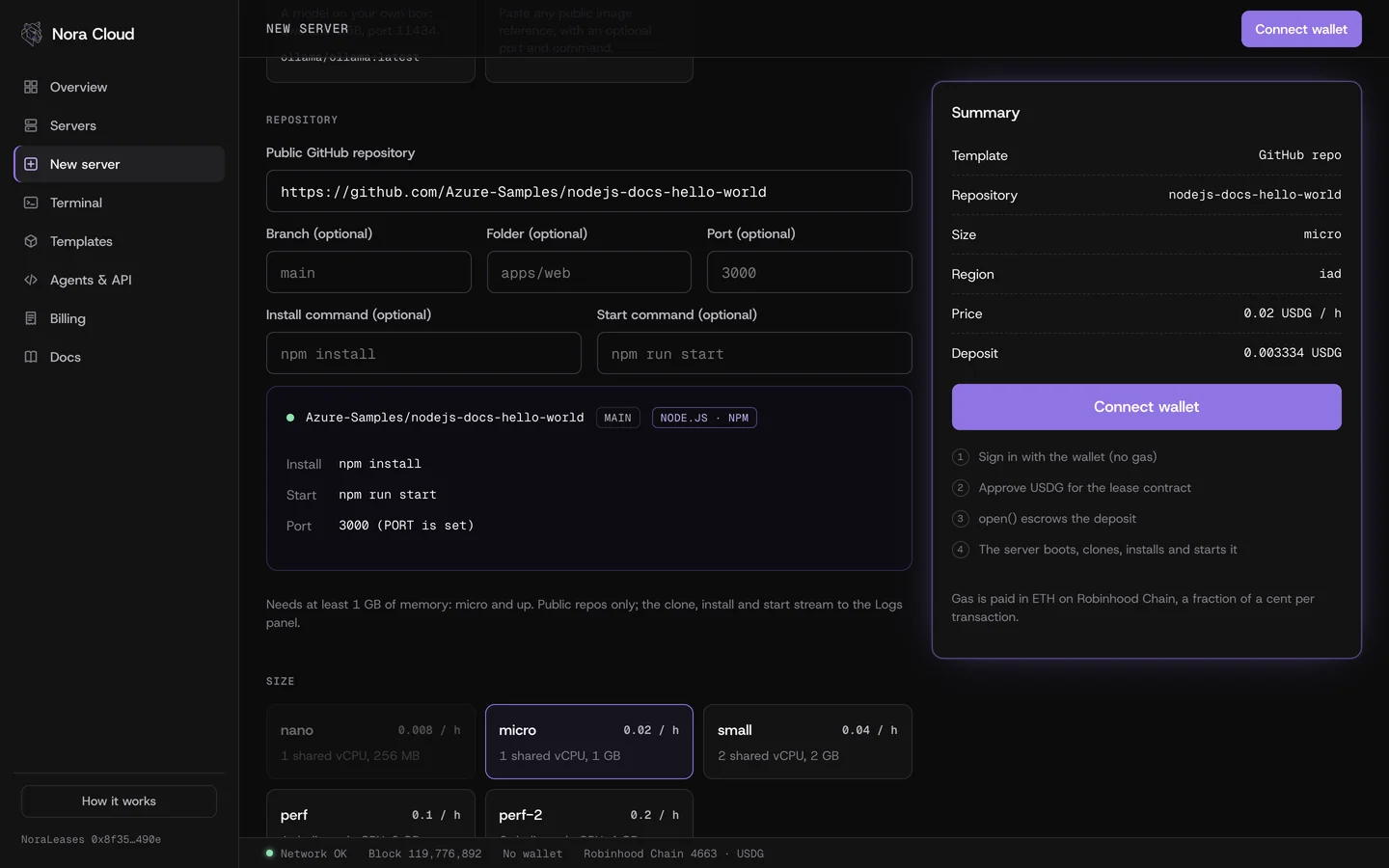
From the app
- Open New server and pick GitHub repo.
- Paste the address, for example
https://github.com/owner/repo. A branch, a sub-folder, the port and your own install and start commands are optional. For a private repo, switch on Private repo (see Private repositories). - Nora reads a public repo before you pay and shows what will run: the package manager from the lockfile, the build and start commands and the port. If the repo is missing or the branch does not exist, it says so and nothing is paid. A private repo cannot be read before payment: Nora checks the address format only and says so.
- Add any secrets the app needs (API keys, database URLs). They are write-only, see Secrets.
- Pick a size (micro or bigger, installs need at least 1 GB of memory), a region and how long to prepay, then confirm the approve and
open(). - The server page opens. The Logs panel shows the clone, the install and your app's output, and prints
[nora] the app answers on port …once it is up. Open the HTTPS address next to it. - Pushed a new commit? Press Redeploy next to the address. See Redeploy.
How Nora runs a repo
The server is the Agent box image (Debian 12 with Node 22, Python 3, git and curl). A fixed boot script makes a shallow clone of the repo (depth 1, the branch you chose) into /srv/app, moves into the folder you gave, then picks the first rule that matches:
| The repo has | Install | Start |
|---|---|---|
| package.json + pnpm-lock.yaml | pnpm install --frozen-lockfile | pnpm run start |
| package.json + yarn.lock | yarn install | yarn run start |
| package.json + bun.lock | bun install | bun run start |
| package.json + package-lock.json | npm ci | npm run start |
| package.json, no lockfile | npm install | npm run start, else node on main, server.js, index.js, app.js |
| requirements.txt or pyproject.toml | pip install -r requirements.txt (or pip install .) in /srv/venv | Procfile web, manage.py runserver, uvicorn main:app, gunicorn app:app, flask run, python app.py |
| index.html only | none | python3 -m http.server $PORT |
- A
buildscript in package.json runs after the install. PORTis set to the port you chose, or to the detected default: 3000 for Node, 8000 for Python, 8080 for a static site. Your app must listen on0.0.0.0(or all interfaces) on that port.- Your own install command replaces the install and build steps; your own start command replaces the start.
- Secrets you add reach the install, the build and the app as env vars, at each deploy and Redeploy.
- If something fails, the logs say which step and the server stays up, so you can open the terminal (it starts in
/srv/app) and fix it by hand. The meter runs as usual until you close the lease.
Your repo URL, branch, folder and commands reach the server as environment variables read by that fixed script. They are never pasted into a shell command by Nora, and the URL is checked against https://github.com/<owner>/<repo> before anything boots.
Redeploy
The Redeploy button on the server page ships the latest commit to the same server, without a new lease. The server runs a fixed script written at boot, which:
- fetches the latest commit of the branch the server runs (depth 1); if that fails, the running app is left as it is;
- stops the app;
- runs the install again only if the committed package or lock files changed (
package.json, the lockfile,requirements.txt,pyproject.toml), or always when you set your own install command; - runs the build script if there is one, then starts the app on the same port.
Every step streams in the Logs panel, from [nora] redeploy r… started to [nora] redeploy r… done in N s, or failed with the step that broke. A failed redeploy leaves the server up with the terminal working, and you can press Redeploy again after a fix. One redeploy runs at a time. Nothing in the request reaches a shell: the API only asks the server to run that script.
The same from an agent: POST /api/v1/leases/{id}/redeploy, box.redeploy() in the SDK, node nora.mjs redeploy <lease> and the redeploy MCP tool. Servers deployed before Update 2 (2026-11-22) do not have the script: deploy the repo on a new server.
Private repositories
Switch on Private repo in New server (or pass private: true from an agent). The server gets read access to that one repository through a deploy key it makes for itself:
- At boot, the server generates an ed25519 key pair in
/root/.ssh. The private key never leaves the server: Nora's app, API and logs only ever see the public half. - The server page shows a Deploy key card with that public key, a Copy button and a link to the repository's Settings, Deploy keys, Add deploy key page on GitHub. Paste it there and leave Allow write access off: the key is read-only.
- Press Deploy (an agent calls
box.redeploy()orPOST /api/v1/leases/{id}/redeploy). The clone runs over SSH with that key, and the install and start follow as for a public repo.
GitHub's published SSH host keys are pinned in the server's fixed script, so the clone refuses any host that does not present one of them; nothing is trusted on first use. Until the key is on the repository, the server stays up and the logs say [nora] waiting for the deploy key; a Deploy pressed too early ends with [nora] clone refused: add the deploy key, then Deploy, and you can press it again once the key is added.
Nora cannot read a private repo before you pay, so the pre-payment check only validates the address, branch and folder format. The meter runs from boot as on any server. When you close the lease the server and its private key are deleted; you can then remove the deploy key from GitHub. If the provider ever restarts the machine (rare), its disk is rebuilt from the image and the server makes a new key, shown in the card and the logs.
Deploy on push
On any repo server, public or private, switch on Deploy on push in its card. Nora then shows what to add in the repository's Settings, Webhooks, Add webhook page on GitHub:
| GitHub field | Value |
|---|---|
| Payload URL | /api/v1/hooks/github/<lease> |
| Content type | application/json |
| Secret | The one shown for this lease (derived for it, never stored) |
| Which events | Just the push event |
Every delivery is checked before anything else is read: the X-Hub-Signature-256 header must be the HMAC-SHA256 of the raw body under that secret, compared in constant time. Nora answers GitHub's ping, ignores any event that is not a push, any push to another branch or another repository, and refuses leases that have ended. A push to the deployed branch runs the same Redeploy as the button:
[nora] redeploy r1795445826794 started (push to main)
[nora] fetching the latest commit of main
[nora] commit f76b706: Bump the version
[nora] package files unchanged: install skipped
[nora] start: npm run start (PORT=3000)
[nora] the app answers on port 3000
[nora] redeploy r1795445826794 done in 3 s
The commit line is the short sha and the first line of the message as plain text, cut at 90 characters, read by the server from git itself. Nothing from the payload reaches a shell. One deploy runs at a time: a push during a deploy queues one more run, and later pushes join it, since it fetches the newest commit when it starts. Switch it off and pushes are ignored, even if the webhook stays on GitHub.
Secrets
API keys, tokens and database URLs go in Secrets: in New server with the GitHub repo template, and in the Secrets card on the server page. Each one is a NAME=value pair that the install, the build and the app read as an env var.
- Names are
UPPER_SNAKE_CASE, 64 characters at most.PORT,PATH,HOME,NORA_*,FLY_*and a few shell names are reserved. Up to 32 per server, 4 KB per value, 32 KB in all. - Values are write-only. The app, the API, the SDK, the CLI and the MCP tools return names only, with a set badge in the card, and the logs print names:
[nora] secrets: API_KEY, DATABASE_URL (values not shown). - A change reaches the app at the next Deploy or Redeploy (the card offers Redeploy now). Secrets stay through every Redeploy and app restart, and are deleted with the server.
Where the values live. Nora does not store them. A value goes from your browser or agent to Nora's API over HTTPS, which hands it once to the server's fixed script on the standard input of the provider's exec API, never on a command line. The script writes one file per name in /etc/nora/secrets on the server's own disk, readable by root only (folder 0700, files 0600). That disk is the only copy: deleting the server deletes it, and if the provider restarts the machine (rare) the disk is rebuilt from the image, so set them again. Your app sees its own env, and you can read the files from your terminal; nobody else can.
What is not supported yet
- Building a Dockerfile. A repo that only has a Dockerfile can still run with your own install and start commands, or publish its image and use the Any public image template.
The deploy starts when the app (or your agent) calls boot right after open(). If nothing calls boot within about 75 seconds, the keeper boots the default Ubuntu box for the lease instead, without the repo. You can still use it from the terminal, or close it and get the unused balance back.
From an agent
The same deploy, from the SDK, the CLI or the MCP server. Details in Agents API, SDK and MCP.
import { Nora } from "./nora.mjs";

const nora = new Nora({ privateKey: process.env.NORA_KEY });
const app = await nora.deploy({ repo: "https://github.com/owner/repo", size: "micro", minutes: 60 });
console.log(app.url);                 // answers once ready is true
console.log((await app.logs()).lines.map((l) => l.text).join("\n"));
await app.stop();                     // close(), server deleted, unused balance refunded

// a private repo, with secrets, redeployed on each push
const priv = await nora.deploy({
  repo: "https://github.com/owner/private-repo",
  private: true,
  secrets: { API_KEY: process.env.API_KEY },
  size: "micro",
  minutes: 60,
});
console.log(priv.key.publicKey, priv.key.addUrl);   // add it as a read-only deploy key
await priv.redeploy();                               // clones over SSH, installs, starts
const hook = await priv.webhook({ enabled: true });  // payloadUrl + secret for the repo's webhook
await priv.setSecrets({ DATABASE_URL: "postgres://...", OLD_TOKEN: null });
console.log(await priv.secrets()); // ["API_KEY", "DATABASE_URL"], names onlyNORA_KEY=0x... node nora.mjs deploy https://github.com/owner/repo --size micro --minutes 60
NORA_KEY=0x... node nora.mjs logs <lease> --follow
NORA_KEY=0x... node nora.mjs deploy https://github.com/owner/private-repo --private --size micro --minutes 60
NORA_KEY=0x... node nora.mjs deploy-key <lease>
NORA_KEY=0x... node nora.mjs redeploy <lease>
NORA_KEY=0x... node nora.mjs webhook <lease> --on
NORA_KEY=0x... node nora.mjs secrets <lease> set API_KEY # value read from your shell's env
NORA_KEY=0x... node nora.mjs secrets <lease> unset OLD_TOKENOver HTTP, check the repo for free, then boot a paid lease with the GitHub template and read its logs:
curl -s "/api/v1/github/check?repo=https://github.com/owner/repo"

curl -s -X POST /api/v1/leases/42/boot -H "authorization: Bearer $TOKEN" \
  -H 'content-type: application/json' \
  -d '{"template":"github","repo":"https://github.com/owner/repo","branch":"main","dir":"","port":3000}'

curl -s "/api/v1/leases/42/logs?since=<cursor>" -H "authorization: Bearer $TOKEN"

curl -s -X POST /api/v1/leases/42/redeploy -H "authorization: Bearer $TOKEN"

# a private repo with a secret: the format is checked, then the server shows its key
curl -s -X POST /api/v1/leases/43/boot -H "authorization: Bearer $TOKEN" \
  -H 'content-type: application/json' \
  -d '{"template":"github","repo":"https://github.com/owner/private-repo","private":true,"secrets":{"API_KEY":"..."}}'
curl -s /api/v1/leases/43/deploy-key -H "authorization: Bearer $TOKEN"
curl -s -X POST /api/v1/leases/43/webhook -H "authorization: Bearer $TOKEN" -d '{"enabled":true}'
curl -s -X POST /api/v1/leases/43/secrets -H "authorization: Bearer $TOKEN" \
  -d '{"set":{"DATABASE_URL":"postgres://..."},"remove":["OLD_TOKEN"]}'